Ask Snowflake Questions in Plain English
Ask Snowflake reporting questions, inspect the SQL, and review authentication, role access, timestamp behavior and warehouse costs before reusing the result.
By the Datarelix Team · Published · Updated · Last verified
If your sales data is already in Snowflake, Datarelix turns a reporting question into a query and chart using a compatible connection. Start by confirming authentication: the current Datarelix Snowflake connector uses username and password, while Snowflake is rolling out stronger authentication requirements.
Confirm that your account can connect
Ask the Snowflake owner whether the connector’s authentication method is accepted for the intended identity. Snowflake’s published rollout places enforcement for all existing users in August–October 2026, with account-specific dates. Accounts requiring MFA or a non-password service identity cannot use this password-only path. Do not weaken the account policy to make a connection work. Snowflake authentication rollout
If the method is incompatible, contact Datarelix about your requirements before starting setup. Key-pair and OAuth are not available in this connector. Where authentication is compatible, obtain the account identifier, warehouse, database, role, schema and approved credentials. The Snowflake connection reference has the fields and access steps.
Ask for a report with clear boundaries
For example, ask:
Compare paid order value by month for April through June 2026, in EUR. Use the order date, exclude cancelled orders and label the amount before refunds.
Example Snowflake SQL:
SELECT DATE_TRUNC('MONTH', ORDERED_AT)::DATE AS MONTH,
       SUM(TOTAL_EUR) AS PAID_ORDER_VALUE_EUR
FROM SALES.REPORTING.ORDERS
WHERE STATUS = 'paid'
  AND ORDERED_AT >= '2026-04-01'::DATE
  AND ORDERED_AT < '2026-07-01'::DATE
GROUP BY 1
ORDER BY 1;
| Month | Paid order value, EUR |
|---|---|
| April 2026 | 2,000 |
| May 2026 | 2,500 |
| June 2026 | 2,300 |
The total is EUR 6,800. A line chart should rise in May and fall in June. Check the reporting time zone and refund definition before using it as revenue. The query returns only months with matching orders; an absent month is not automatically a verified zero.
What access does the reporting role need?
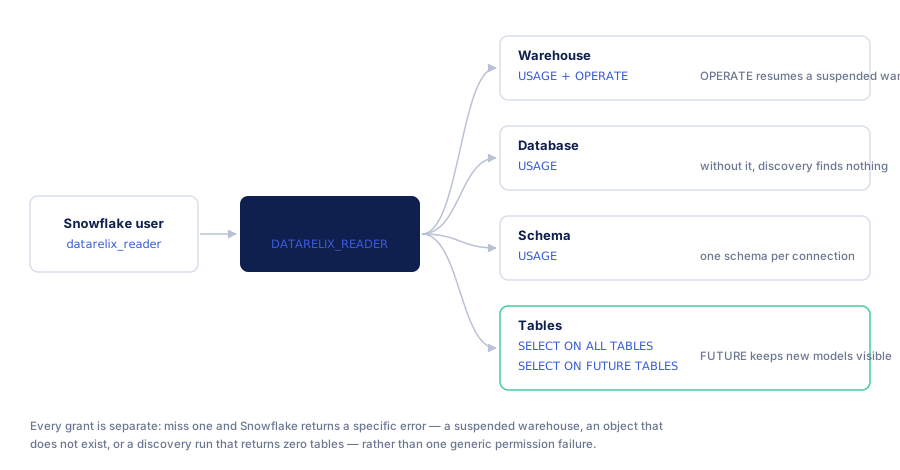
The reporting role needs warehouse USAGE, database and schema USAGE, and SELECT on approved objects. If AUTO_RESUME is enabled, warehouse USAGE allows a submitted query to resume the warehouse automatically. OPERATE is for explicit operational actions such as manual resume and is not required for that automatic behavior. Snowflake warehouse privileges
An administrator authorised to manage these grants can give an existing, approved role the minimum for one reporting table. Replace the example objects with yours:
GRANT USAGE ON WAREHOUSE reporting_wh TO ROLE reporting_reader;
GRANT USAGE ON DATABASE sales TO ROLE reporting_reader;
GRANT USAGE ON SCHEMA sales.reporting TO ROLE reporting_reader;
GRANT SELECT ON TABLE sales.reporting.orders TO ROLE reporting_reader;
Grant a view separately when the report reads a view. The administrator remains responsible for inherited roles and for the account’s authentication policy: these grants do not make a password login acceptable on an account that requires MFA or a non-password service identity. Datarelix validates generated SQL as read-only before it runs (read-only AI analytics controls); the role’s grants remain the database-side boundary. The complete setup, including the account identifier and network policies, is in the Snowflake connection reference.
As an optional administrative choice, the same role can also be granted tables created later in that schema:
GRANT SELECT ON FUTURE TABLES IN SCHEMA sales.reporting TO ROLE reporting_reader;
A future grant applies only to tables created afterwards, not to existing ones, and it covers tables only: views need their own future grant. It reduces maintenance when every new reporting table should be readable, and it widens future access for the same reason, so treat it as a scope decision rather than a fix for a table the role cannot read today. Snowflake GRANT reference
Snowflake compute charges remain separate from your Datarelix plan. Warehouse size, running time and suspension settings affect consumption. Frequent resumptions can also matter because warehouse billing has a minimum on startup; choose settings with the owner based on the actual reporting workload. A returned three-row table does not imply a cheap query. Snowflake warehouse considerations
Match connection fields to the reporting source
The account identifier locates the Snowflake account. The warehouse supplies query compute, the database and schemas identify the reporting objects, and the active role determines access. A correct password cannot compensate for a role missing access to the warehouse or table.
Use the account identifier supplied by the administrator, preferably the organisation-and-account form described by Snowflake. Keep it distinct from a full browser URL. Network policies and private connectivity also affect reachability; confirm the route available to the hosted service before troubleshooting SQL. Snowflake account identifiers
| Access needed | Purpose | Point for the owner to check |
|---|---|---|
Warehouse USAGE | Run queries using that warehouse | Auto-resume setting and available compute |
Database and schema USAGE | Resolve approved objects | Each schema selected for the connection |
Object SELECT | Read the reporting tables or views | Current objects and intended treatment of future ones |
| Role assignment | Use the reporting role | The identity’s active and inherited access |
The connection guide keeps the complete grant list; the future-table option above is a scope decision, not a repair for missing access.
Read Snowflake SQL with its types in mind
The monthly example groups paid orders using DATE_TRUNC and an exclusive July 1 boundary. An analyst should confirm whether ORDERED_AT represents the agreed business event and how the timestamp type interacts with the reporting time zone.
Snowflake has distinct timestamp types, including TIMESTAMP_NTZ, TIMESTAMP_LTZ and TIMESTAMP_TZ. Do not assume a timestamp stores a local business date merely because it displays one. Test a record near the reporting cutoff when reconciling a report. Snowflake date and time types
Quoted mixed-case identifiers need their exact form. If a report joins customers, orders and items, inspect the source names and keys as well as the date function. For nested VARIANT fields, first establish the structure and what each expanded row represents; flattening an array can multiply the rows used in a sum.
Declared keys still need a data check
On Snowflake standard tables, foreign-key declarations do not enforce referential integrity. Their presence can help describe a relationship without establishing that every row matches or that a join has the intended cardinality. Constraint behavior differs for hybrid tables, so identify the table type. Snowflake constraints
When a relationship is inferred, ask the analyst or source owner to confirm its keys and expected matches. Check a subtotal before and after joining. Descriptions can explain the intended grain, but they do not repair duplicate keys or a missing source record.
Estimate cost from warehouse activity
Ask the warehouse owner to review running intervals, size and concurrency for the trial. Query duration alone omits idle time and startup minimums. For a deliberately simplified example, if a warehouse’s applicable rate is one credit per hour, one continuous 15-minute running interval consumes 0.25 warehouse credits. That illustration excludes other services, pricing adjustments and any additional running intervals.
Use the observed workload to choose auto-suspend and source-side query limits. Repeated dashboard refreshes are new work for the source; fixed-date SQL can still incur execution costs. Snowflake charges and Datarelix usage are separate budget items.
Compare a Snowflake-native reporting path
If all of the relevant data is in Snowflake, include the platform’s own reporting and assistant options in the evaluation; the comparison of AI analytics and traditional BI gives workflow criteria for that decision. Check authentication, user access, SQL review, charts and saved reporting for the actual product and plan. An independent tool may be useful when you want a familiar reporting interface for several supported engines; that does not imply a single cross-engine join.
Business users should evaluate the complete path to a reusable report. Analysts should try a realistic join, date boundary and follow-up before choosing by a demonstration’s first answer alone.
Reuse the chart after review
Confirm the SQL’s source, dates and filters with a known report. Add a chart to a private Datarelix dashboard once the definition is right. Refreshing manually reruns the saved query and can consume Snowflake compute. Fixed April–June dates remain fixed after refresh.
Use the answer verification guide to separate checks you can make from joins or calculations that need a SQL reviewer. Confirm connection compatibility before committing time to a trial.