Why Your AI Tool Picks the Wrong Column
A column called “amount” does not say whether it includes tax or refunds. Descriptions give a query tool business context, but the resulting calculation still needs checking.
By the Datarelix Team · Published · Updated · Last verified
Missing schema context can make an AI tool pick the wrong column: amount and net_amount both look like revenue, and created_at and paid_at both look like an order date. Schema context, meaning descriptions of statuses, amounts, dates and relationships, supplies that meaning, and reading the executed query shows whether it was applied. This guide shows which descriptions change an answer, how to prioritise them and how to retest after editing.
Why did the tool pick the wrong column?
A wrong answer can come from an ambiguous question, missing descriptions, a model error, a join mistake or stale data. Inspect the query and source before deciding which cause applies.
When a tool uses amount instead of net_amount, describe the difference. If it selects an old table, identify the current reporting table. Context is useful when it supplies meaning absent from the names themselves.
Example: clarifying one description
Suppose an orders table contains completed, pending and cancelled orders. You ask for completed sales in August 2026. A query without a status filter would include all three:
SELECT SUM(total_eur)
FROM orders
WHERE ordered_at >= DATE '2026-08-01'
  AND ordered_at < DATE '2026-09-01';
Add a description: “Use status = 'completed' for completed sales; total_eur is order value before refunds.” A suitable query would add that filter. An added sentence does not guarantee the same SQL.
Check the next result against a known answer. If the description contradicts your business definition, correct the description rather than treating it as authority.
Describe the fields that affect the answer
| Field or table | A useful description includes |
|---|---|
| Status | Meaning of each relevant value and which to include |
| Amount | Currency, taxes, discounts and refund treatment |
| Date | Business event represented and reporting time zone |
| Identifier | Whether it identifies an order, customer or event |
| Relationship | How tables connect and whether several rows can match |
| Reporting table | What one row represents and whether the table is current |
Avoid descriptions that simply repeat the name. “Customer identifier” does not explain whether the same person can have several IDs. Start with the fields used by your first report instead of documenting an entire database before trying a question.
Schema structure and business meaning
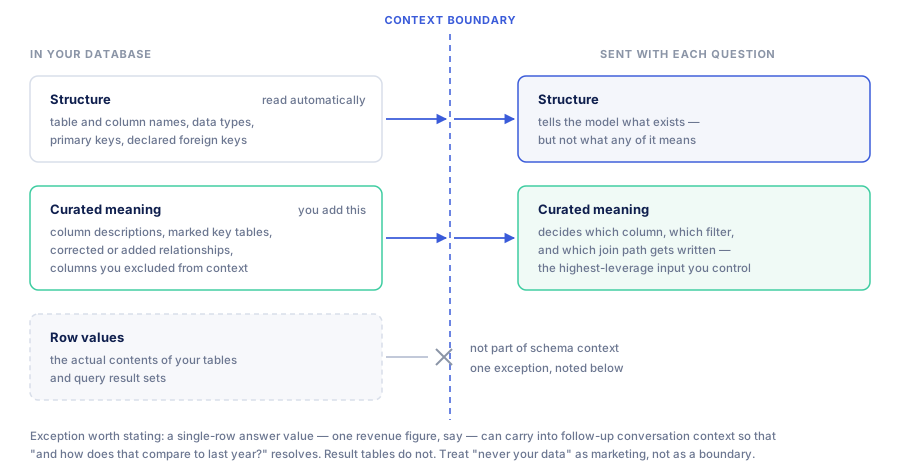
Schema discovery supplies names, types, primary keys and declared relationships where the source exposes them. These tell an analyst what can be joined and which operations a column permits; the query generator works from the same structure, as how text-to-SQL generates database queries describes. They do not necessarily explain which table is approved for reporting or what an amount includes.
Business context supplies those definitions. A sales manager can explain when an order is considered complete; an analyst can identify the field that records that event and the join that preserves one row per order. Useful descriptions combine this knowledge instead of paraphrasing the column name.
| Ambiguity | Possible mistake | Context to review |
|---|---|---|
| Two amount columns | Selecting gross amount for a report after refunds | Define both amounts, currency and refund treatment |
| Similar tables | Querying an abandoned migration | Identify the current table and replacement date |
| Test accounts | Including internal purchases in sales | State the test flag and intended reporting exclusion |
| Undeclared relationship | Joining on similar names with different meanings | Give the key pair and expected number of matches |
| Pre-aggregated data | Repeating daily totals after another join | State what one row represents and which dimensions distinguish it |
| Several timestamps | Reporting by creation rather than shipment | Name the business event and stored time zone |
These are possible causes to investigate. A model can still choose the wrong field when the relevant description is present.
Choose descriptions that affect the next report
Start with the columns used in filters: status, category, account type and flags. Then review fields with similar names, such as created_at and paid_at, or amount and net_amount. Write down the distinction that changes the answer.
For deprecated tables, name the replacement and explain whether historical data still requires the old source. For relationships, specify both keys and the intended grain. An inferred foreign key is a proposal to check, particularly where the database does not enforce relationships.
Mark key reporting tables to help prioritise relevant context. This does not grant access to them or ensure that an arbitrarily large schema fits into a model request. Limit the connection’s scope to the data needed for the analysis, and inspect the sources selected in actual answers.
Descriptions and a semantic layer serve different roles
A description explains a field or a rule. A semantic layer can centralise metric definitions and their execution. Writing “revenue excludes refunds” in a description does not create an enforced metric or reconcile two tables that implement refunds differently.
If you already have approved reporting views or centrally defined metrics, use those outputs where the connector can query them. Check that the generated SQL preserves their intended grain. The self-service analytics guide explains how this fits with existing reporting.
If you start with an operational database and no semantic layer, you can still document the sources for a first report. Define the measure, its filters and its date field; ask a known question and reconcile the result. Introduce a maintained reporting view when repeated business logic needs a more consistent implementation.
Review changes with a small set of known questions
Keep examples that exercise the definitions: a cancelled order, an order refunded in a later month, two customers with the same display name, or a date near midnight in the reporting time zone. An analyst can prepare reference SQL; a business user can confirm which records should count.
After changing a description, ask the relevant questions again and compare the sources, filters and totals. Record what changed in the definition as well as the output. A different answer may reflect corrected context, changed source data or a model error; investigate the query before attributing the improvement to the description alone.
Keep reviewed wording in a place your team maintains, such as database documentation, a dbt description or a versioned file. Apply relevant changes to Datarelix’s connection descriptions as well. Assign a person to review them when statuses, date fields or reporting definitions change.
Edit descriptions in Datarelix
Datarelix reads schema structure on connection. Optional AI schema analysis proposes descriptions and relationships from that structure. You can edit descriptions, review inferred relationships, adjust keys, mark key tables and exclude columns from context. These edits describe the connection; they do not alter the source database.
AI schema analysis has a monthly allowance; see pricing. Generated descriptions need review. Datarelix does not automatically import your existing dbt descriptions or database comments into this editing workflow.
Keep context useful as data changes
Have someone responsible for the dataset review descriptions when fields change. If you already document metrics elsewhere, keep those definitions consistent and apply relevant updates to Datarelix. A stale description can direct a query to the wrong field.
Descriptions are model inputs, so never put passwords or connection secrets in them; the security overview covers what else reaches the model and what is stored.
Context cannot reconcile contradictory source tables or guarantee the right answer. Recheck a known question after editing, following the verification workflow. The question guide covers selecting tables and writing more precise requests.