Build Self-Service Analytics Without Replacing Your Data Stack
You can start with an existing database and a reporting question. Keep the data where it is, arrange appropriate read access, and check an answer before turning it into a recurring report.
By the Datarelix Team · Published · Updated · Last verified
You can start self-service analytics with the database you already run: connect an approved read-only identity, ask one reporting question, check the answer against a known figure and save the chart. A warehouse migration, a semantic layer or a new BI platform is not a prerequisite for that first report. What you do need is scoped access, a clear definition of the measure and a habit of verifying before reusing, which is what the sections below set out.
Start with the access you have
You do not need to replace your database or buy a warehouse to try conversational reporting. You do need an accessible source, permission to use it, and enough context to identify the right data.
If you already have connection details, use the connection guide for that source. If you do not, ask its owner for a read-only account scoped to the reporting tables you need. Database access through another application does not necessarily provide credentials you can reuse.
Give the owner a concrete request: “I need to report completed orders by week and region. Which table contains the approved amounts and dates, and can I have read access to it?” The owner may need to arrange network access too.
Define a first report
A starting brief for a sales team:
| Decision | Agreed example |
|---|---|
| Question | How did completed sales change last week? |
| Source | The approved orders reporting table |
| Definition | Completed order value, before refunds, in EUR |
| Period | Monday through Sunday, in the reporting time zone |
| Check | Compare with a known report and inspect a small sample |
| Reuse | Save the chart after checking its calculation |
This brief is useful whether you work alone or with a data team. If a definition is unclear, settle it before asking the tool to compute it. The semantic-context guide shows how descriptions can record those decisions.
What stays in your existing system?
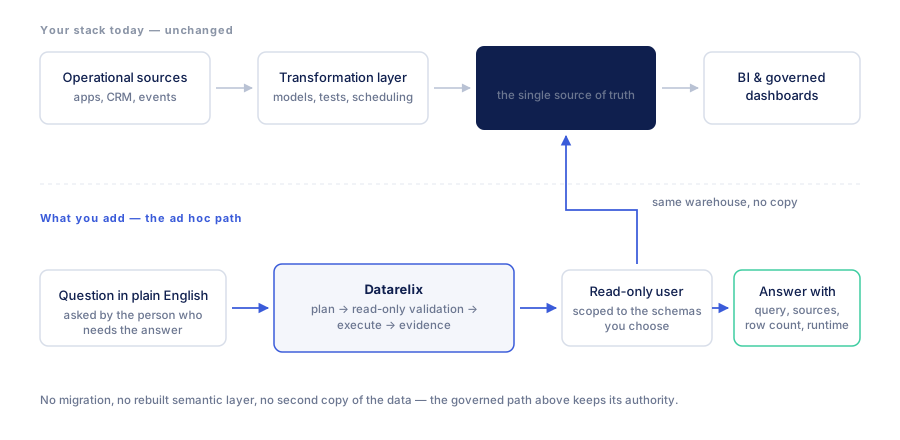
Queries run against the connected source. Database permissions remain relevant, and Datarelix applies read-only query validation. Datarelix does store the result of a query with its run record; querying live data does not mean no result data is retained. Read data handling before connecting.
Each conversation uses one connection. Supporting several database types does not imply a single question joins data from several connections. Check the connector’s allowed scope.
Two starting points: an existing report or an existing database
If your team already has a warehouse and BI reports, choose a maintained reporting view for the first connection. Keep its established definitions and ask a question the existing report does not answer, such as a new customer breakdown. The analyst can compare the generated SQL with the report logic before anyone saves the result.
If you have an operational database and no BI stack, begin with a task such as weekly completed orders. Identify the relevant table, date and status fields with the person who understands that database. You can start with a small, understood scope; a warehouse migration is not a prerequisite.
In either case, business users supply the question and its meaning. Analysts can investigate joins, prepare reusable views and review the generated SQL. Self-service changes how a question is started and reused; it does not remove the need for those skills.
Keep responsibilities explicit
| Concern | Where to maintain it | What the reporting workflow adds |
|---|---|---|
| Metric definition | Approved documentation, source view or metric system | A visible interpretation to compare with that definition |
| Source permissions | Database identity, roles and policies | A connection using the access assigned to it |
| Data freshness | Source loads and reporting models | An execution time for the query that read available data |
| Ad hoc analysis | The question and reviewed calculation | A result that can be refined through follow-ups |
| Recurring report | Maintained SQL or a saved chart | A documented refresh and review routine |
| Sharing | An approved collaboration or export process | The product’s actual sharing or export capabilities |
Reading directly from the source avoids maintaining a full second warehouse for this workflow. It does not mean the service stores nothing: Datarelix retains query results and run artifacts. Include those stored outputs in the access and retention review.
Scope the connection around a useful question
For “sales by region,” the connection may need a sales view and a region field. It may not need addresses, payment details or unrelated operational schemas. Give the database owner the intended report and required fields rather than requesting access to every table.
Analysts should check what one row represents before combining sources. A view with one row per order should not have its totals multiplied by a join to several refunds or items. For repeated calculations, a maintained view can make that logic easier to review and reuse.
Descriptions help explain statuses, amounts and dates. They do not enforce definitions or create missing permissions. Review generated relationships before relying on them, especially when the source does not declare foreign keys. The semantic-context guide gives a practical review sequence.
Turn a useful question into repeatable reporting
- Choose a question with a reference answer, and record the period and definition.
- Ask it through the connection and inspect the sources, result and query.
- Reconcile differences with the reference, including filters, missing data and joins.
- Save the checked chart and give it a title that names the measure and period rule.
- Refresh manually when the next source load is ready, and confirm the result before exporting.
Relative dates move with each execution; fixed dates remain fixed. A report for the previous complete week needs different SQL from a report permanently covering 3–9 August 2026. The dashboard workflow shows that distinction and the refresh behavior.
Choose where an analysis should go next
A one-off investigation can remain a saved conversation. A personal recurring view can become a dashboard. If several people need shared ownership, scheduled distribution or a certified organisational metric, evaluate those requirements in the reporting platform you use for that purpose.
Datarelix dashboards and connections remain private to their creator’s account; Team pools usage rather than making those assets shared. Exports can support review, but an exported chart is a snapshot. Agree how a colleague will find the definition and date behind the image.
From one answer to a reusable chart
Ask the first question and verify its result. Once checked, request a chart, save it to a dashboard and refresh it when you need current data. Refresh uses the stored query; date filters continue to behave as written.
Datarelix dashboards are private to the creating account and refresh on demand. Export a table or chart to share a snapshot. For a shared live reporting workspace or scheduled distribution, choose a workflow that supports those features.
Follow the quickstart with one reporting table. Review plans and limits before adding more connections or rolling the workflow out to other people.