Introducing Forecasting Pipelines in Datarelix
Take a question about what comes next through a saved forecast plan, historical tests and a publication decision.
By the Datarelix Team · Published · Last verified
Forecasting pipelines are now available in Datarelix’s Data science (Beta) section. Describe a measure and how far ahead you want to predict it; Datarelix drafts a query and forecast plan, checks the history, and evaluates eligible models against a seasonal baseline. You review the first result before it becomes the pipeline’s published forecast, then choose how subsequent results should be reviewed and refreshed.
Start with a business question
“What might monthly net sales look like next quarter?” requires a definition of sales, an agreed reporting period and usable history. The new workflow keeps those decisions together with the forecast. It is designed for business users who own the measure and analysts who need to inspect the query and validation settings.
Open Data science → New forecast, choose a connected SQL source, and describe the task:
Forecast Acme monthly net sales in EUR for the next three months. Exclude cancelled orders and use completed months only.
Add context about taxes, refunds, reporting time zone and missing periods. The same schema context and business definitions that help a database answer use the right columns also matter when preparing a forecast. If access is still being arranged, send the database owner the connection setup documentation.
See what the data supports before training
The proposed plan names the measure, units, period, horizon, grouping and exclusions. The data readiness check shows how much history is available, where it ends, how many past validation windows fit, and which models are eligible. Missing or duplicate periods, a truncated source result or insufficient history can block training.
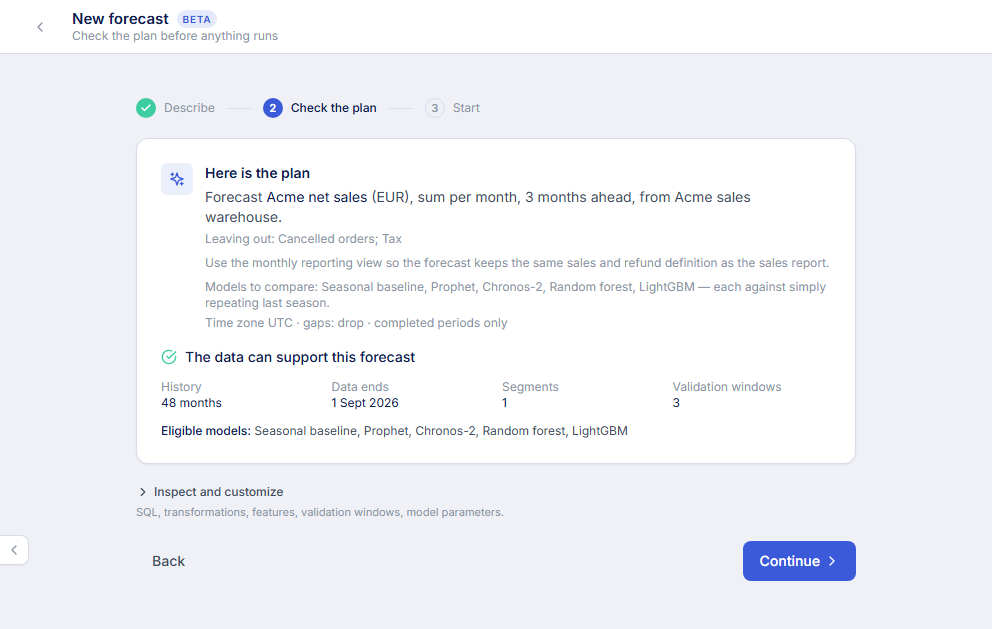
An analyst can expand Inspect and customize to review the SQL, mappings, features, validation windows and model parameters. Changing the draft requires another data check. Start with the same care you use to verify AI-generated SQL and results: the right model cannot repair a sales definition that counted the wrong transactions.
Compare against a seasonal baseline
Models are evaluated with rolling validation: learn from earlier history, predict a later period, then compare the prediction with the actual values. Eligible families include Seasonal baseline, Prophet, Chronos-2, Random forest and LightGBM. Availability, history and the selected compute allowance govern the experiments that run.
The review shows the candidate’s error, the seasonal baseline, consistency across past tests, weak segments and prediction-range coverage. The baseline can win. Past tests give evidence about the chosen history; they do not guarantee future accuracy or capture an event that is absent from the data.
The forecasting workflow extends Datarelix’s query and analysis features with a saved definition and an explicit decision about which forecast becomes current. For the underlying reporting measure, keep a weekly sales report with clear revenue and refund definitions that the team can reconcile.
Decide what needs your review
Choose Let it run to review the first forecast and later model changes while allowing routine refreshes of an accepted configuration to publish automatically. Choose Review every result to approve each publication, or Review everything to approve both execution plans and results.
Material definition changes still require review. An execution approval covers the proposed batch and its allowance; publishing a different model or configuration is a separate decision. A waiting review stays pending when you close the browser.
“Publish” selects the current result inside your account. It does not make a forecast public or share it across a team.
Keep a forecast current
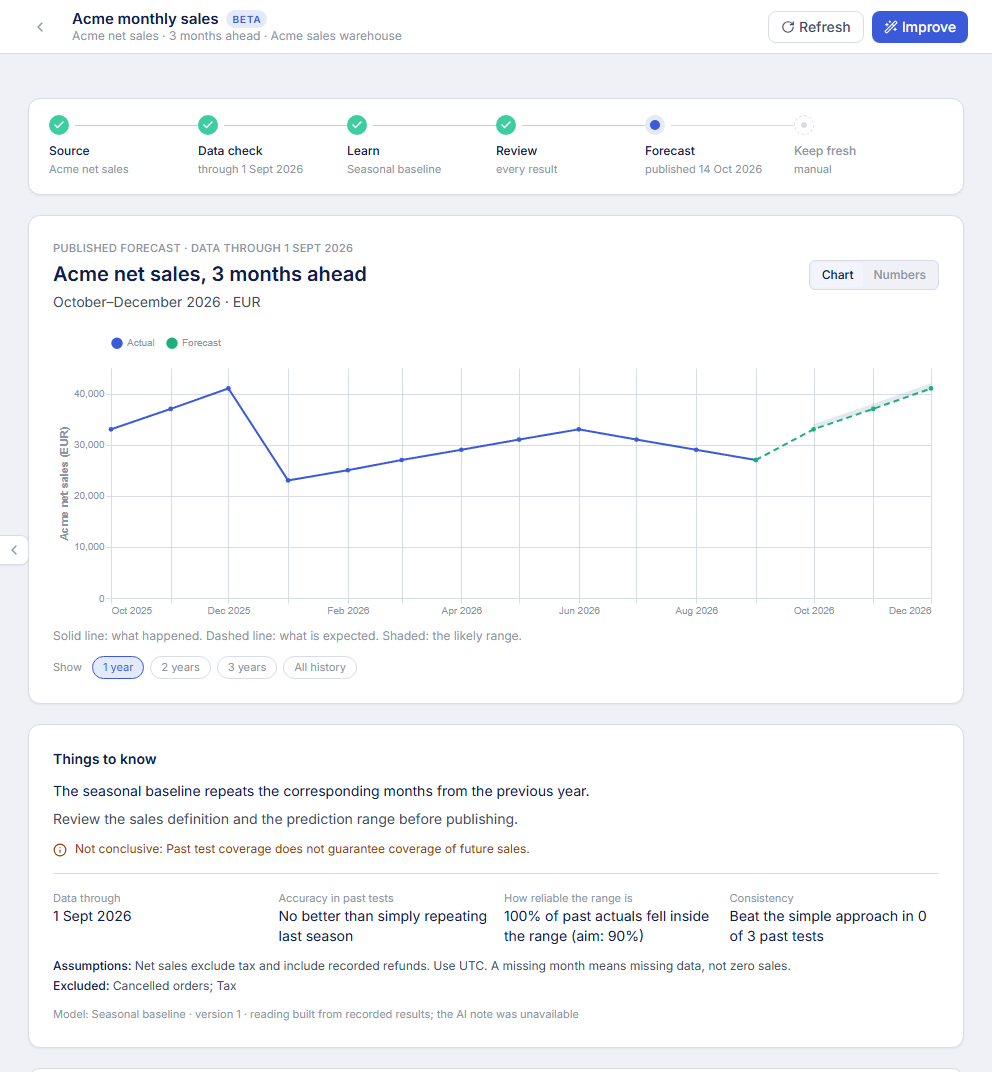
Refresh refits the accepted configuration on current source data. Improve explores other configurations within the allowed scope. You can request refreshes manually or schedule them daily, weekly or monthly after publication, with your review rules still applying.
The beta currently uses SQL connections; Kusto, Elasticsearch and the user-delegated authentication methods excluded by the picker cannot be used for forecasting. Source reads can incur database or cloud charges. The forecasting walkthrough covers these prerequisites, every review control and recovery from data-check failures.
To try it on a measure your team already understands, follow forecast monthly sales from your database and take one defined sales series through its first publication review.