Forecast Monthly Sales From Your Database
Carry the sales definition your team already reviews into a forecast for the next quarter.
By the Datarelix Team · Published · Last verified
A monthly sales forecast starts with a consistent historical measure and a horizon the history can support. In Datarelix’s Data science (Beta) section, describe that measure, inspect the drafted query and data check, then review the model’s historical tests before publishing the forecast. The useful first decision is whether the source and evaluation match the sales question your team needs to answer.
Define sales before predicting them
For Acme, the planning question is net sales in EUR for October through December 2026. Its monthly reporting view contains completed months through September. Net sales exclude tax and cancelled orders and include refunds recorded against those orders at the reporting cutoff.
That definition is different from cash collected in the month. A refund for an older order can revise the older month’s net sales; decide whether you want a restated order-cohort measure or a cash-movement measure before forecasting it. The weekly sales reporting guide works through that distinction and the risk of duplicating order values when joining refund rows.
| Decision | Acme’s choice | Why it matters |
|---|---|---|
| Measure | Net sales, excluding tax | Avoids switching between gross receipts and sales after refunds. |
| Currency | EUR | Different currencies need an agreed conversion basis before aggregation. |
| Period | Completed calendar months, UTC | Keeps a partial October out of the historical series. |
| Horizon | Three months | Defines the future period and the length of each historical test. |
| Missing month | Missing observation | An absent load is not evidence of zero sales. |
| Grouping | Whole business initially | Starts with the total the sales owner can reconcile. |
Record these choices as schema context and business definitions. The sales owner confirms the measure and cutoff; the analyst checks that the reporting view implements them.
Draft a forecast from the reporting view
Use an active SQL connection with access to the reporting view. You can ask in ordinary language; the analyst can inspect and adjust the query. For the connection requirements and controls, follow the forecasting documentation.
In Data science → New forecast, select the connection and enter:
Forecast Acme monthly net sales in EUR for the next three months. Exclude cancelled orders and use completed months only. Use the monthly sales reporting view.
Add the tax, refund and missing-month rules in the assumptions field. Choose Draft the plan, then confirm sum per month, EUR, the horizon and the source’s end date.
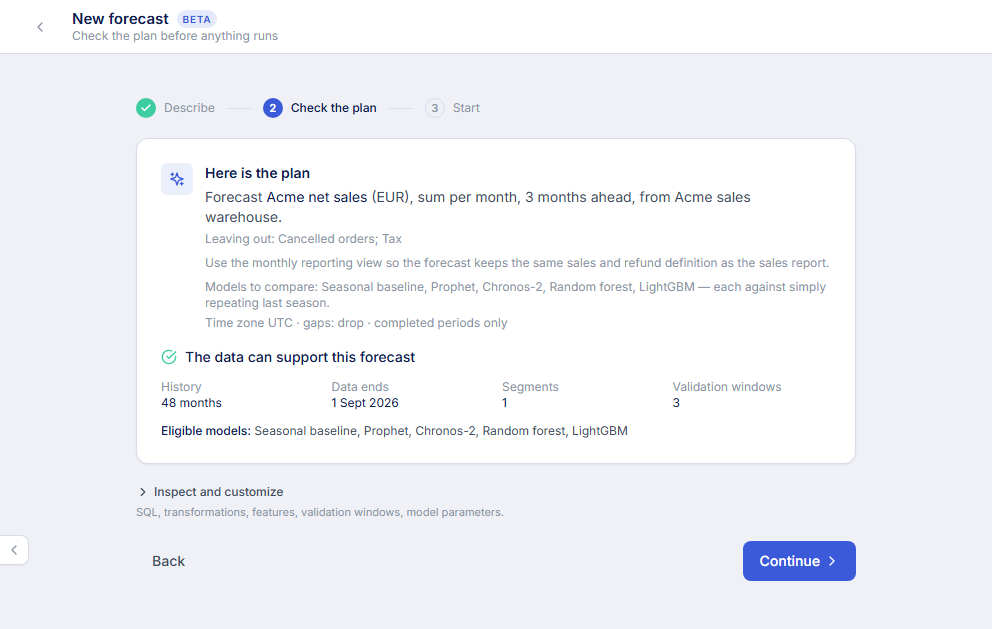
Reconcile the history and inspect the past tests
Open Inspect and customize and review the source SQL. Confirm one row per month for this aggregated series, with the net sales value already calculated. Check a known month against the approved report and investigate gaps and duplicate keys using SQL and result verification.
The data readiness check reports available history and validation windows. A long horizon or a newly introduced segment can leave too little history for useful tests. Shorten the horizon, extend the historical range or reconsider the grouping when the check blocks progress. Do not turn missing data into zero just to make a run proceed.
During rolling validation, the model predicts later historical months using only earlier history. Review the error relative to the seasonal baseline, not just the appearance of the forecast curve. With MAE selected, a lower value means smaller average absolute error in EUR. Also inspect consistency across windows and how often actual observations fell inside the proposed range.
A promotion or price change mentioned in the question is context, not a supplied future data series. If the model uses an external predictor, its timing and future availability must be represented in the plan and the data. Treat a new market, product launch or policy change as a business assumption requiring separate judgement.
Publish a result you can use in the sales review
Choose Review every result if each update needs the sales owner’s sign-off. At the first review, use Ask for an explanation for an unclear recommendation, then Publish candidate when the result is appropriate. A seasonal baseline may remain the selected model; extra model complexity does not ensure a better result.
The published forecast remains within your account. In Things to know, check the history end date, inconclusive findings and prediction-range coverage. The point forecast is an estimate, and the range is not a guaranteed bound on future sales. Agree on the operational response if actual sales fall above or below it.
Refresh when the source is ready
Refresh rereads the source and refits the accepted configuration. If September refunds are restated after the first run, a refresh can change the historical basis as well as the future estimate. Record that reporting cutoff when explaining a changed forecast to the sales team.
Schedule a monthly refresh after publishing, or leave it at Only when I ask until the reporting view’s update process is dependable. Review the next refresh in Settings. Improve explores alternatives within the configured allowance; it does not silently publish a different model. Forecast scheduling does not add scheduling to dashboards.
You can build a dashboard from database questions for the actuals alongside your forecasting workflow. Explore the Datarelix feature overview for the reporting tools, and use the screenshot walkthrough to create the first forecast from an agreed monthly measure.