Ask PostgreSQL Questions in Plain English
Query PostgreSQL in plain English, inspect a regional sales report and a customer-ranking query, and review the schema, permissions and SQL details that affect the answer.
By the Datarelix Team · Published · Updated · Last verified
You have order data in PostgreSQL and need last month’s sales by region. In Datarelix, you can describe the report in words, inspect the generated SQL and result, then ask for a chart. You need connection details and permission to read the relevant tables or views; business users can start without writing SQL, and analysts can inspect and refine the generated query.
Define one report before connecting
For a retailer, the request might be:
Show paid order value by region for August 2026, in EUR. Exclude cancelled orders. Use the order date, and show refunds separately if they are available.
Specify which date means a sale and whether the amount includes tax or refunds. If those definitions are unclear, the database owner or the person responsible for reporting can help identify the right fields.
Get the access details
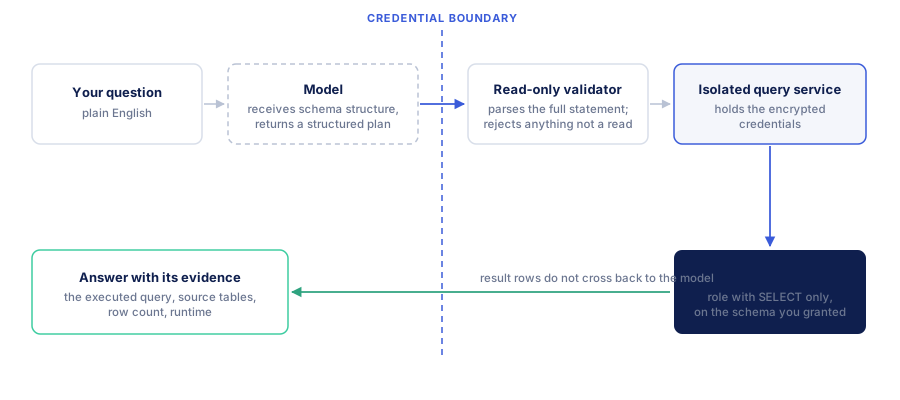
If you already have an approved PostgreSQL connection string, use it when adding a connection. Otherwise request the host, port, database, allowed schema, TLS settings and a dedicated reporting identity. The source must be reachable from the hosted Datarelix service; the security overview shows what that service stores and what reaches the model.
The owner should grant access to the necessary objects and review inherited and public permissions. PostgreSQL’s pg_read_all_data role provides broad read access and does not bypass row-level security; it is not a substitute for checking database CONNECT access. A scoped reporting role is often a better fit for one report. PostgreSQL predefined roles
The PostgreSQL connection reference contains grants, TLS fields and troubleshooting. Use a direct connection or a compatible session pooler initially. Transaction-pooler compatibility depends on the provider, version and prepared-statement configuration; confirm the endpoint with its owner.
Review a result before charting it
This PostgreSQL query reports paid order value, not net revenue after refunds:
SELECT region, SUM(total_eur) AS paid_order_value_eur
FROM reporting.orders
WHERE status = 'paid'
  AND ordered_at >= DATE '2026-08-01'
  AND ordered_at < DATE '2026-09-01'
GROUP BY region
ORDER BY paid_order_value_eur DESC;
| Region | Paid order value, EUR |
|---|---|
| North | 1,200 |
| South | 800 |
A bar chart of this table should show North at 1.5 times South’s value. The two returned rows are regions, not two orders. If refunds live in another table, ask for a separate refund total before deciding how to calculate net revenue.
Check a known total and ask a SQL reviewer to inspect joins if the answer uses several tables. For timestamps, agree on the reporting time zone: month boundaries can differ from the database session’s default.
What does the generated SQL look like?
Against a retailer’s schema — customers, orders, order_items — the question “Who were our top 10 customers by completed order value before refunds in Q2 2026?” can be represented by the SQL below. All item prices are assumed to be in EUR:
SELECT
  c.customer_id,
  c.name,
  SUM(oi.quantity * oi.unit_price) AS revenue
FROM customers AS c
JOIN orders AS o ON o.customer_id = c.customer_id
JOIN order_items AS oi ON oi.order_id = o.order_id
WHERE o.status = 'completed'
  AND o.ordered_at >= DATE '2026-04-01'
  AND o.ordered_at < DATE '2026-07-01'
GROUP BY c.customer_id, c.name
ORDER BY revenue DESC
LIMIT 10;
This is idiomatic PostgreSQL: half-open date ranges rather than BETWEEN, date_trunc('quarter', …) where a period grain is needed, LIMIT/OFFSET for pagination, double quotes for identifiers that need them. SQL copied from another dialect may use TOP 10 or backticked identifiers that PostgreSQL rejects outright — the general mechanism is in text-to-SQL explained.
Notice also what is decided here: status = 'completed', gross rather than net of refunds, a calendar quarter rather than trailing 90 days. Those are interpretations. Seeing the query is how you check them, which is the whole point of verifying an AI-generated answer.
PostgreSQL details analysts should check
| Detail | Why it matters for the answer | Practical check |
|---|---|---|
| Schema selection | Tables with the same name may exist in several schemas | Confirm the selected allowed schemas and inspect qualified source names |
| Views and materialized views | A view may encode an approved definition; a materialized view has its own refresh history | Ask who maintains it and when its data was refreshed |
| Row-level security | The connected role may see fewer rows than the role used by an existing report | Compare effective identities and policies before interpreting an empty result |
| Quoted names | Mixed-case identifiers need their exact quoting | Compare generated names with discovery output |
| Date boundaries | Timestamp interpretation can depend on type and time zone | Review records around midnight and month end |
| Join grain | One order may match multiple items or payments | Compare distinct order IDs with joined rows before summing order-level amounts |
The connection can include several allowed schemas. Cross-schema work still needs the required grants and a query within the configured scope. Do not create duplicate connections solely because a reporting query uses two allowed schemas.
Review permissions without changing production objects
An analyst or database owner can inspect a known table’s read privilege in their existing SQL client:
SELECT has_table_privilege(current_user, 'reporting.orders', 'SELECT')
       AS can_read_orders;
This checks one privilege, not the role’s complete effective access. Review inherited roles, public grants, policies and callable functions separately. If future reporting tables should be readable, the administrator must configure default privileges for the role that creates those tables; changing defaults for another role does not cover them. The PostgreSQL connection reference includes the administrator steps.
Diagnose connection and result problems separately
A failed login calls for checking endpoint, credentials, network reachability and TLS. An empty schema list calls for checking database, allowed schemas and discovery permissions. An empty query result calls for checking filters, available data and row policies. Rewording the business question cannot repair a missing connection grant.
Prepared-statement behavior depends on the pooler and configuration. Start from the endpoint your provider recommends for the client; use a direct or suitable session connection when diagnosing a transaction-pooler issue. PgBouncer documents protocol-level prepared-statement support with the relevant configuration; SQL-level PREPARE has different constraints. PgBouncer feature compatibility
For a slow report, shorten the period and inspect the generated joins. The analyst can examine the query plan using approved database tooling and discuss indexes or reporting views with the owner. A two-row output can still require reading a large orders table. Datarelix’s read-only reporting workflow does not perform index creation, migrations or database administration.
Save the useful part
Ask for a bar chart once the table matches the intended definition, then add it to a dashboard. A dashboard is private to your account and uses one connection. Refresh manually to rerun its saved query. This example uses fixed August dates, so refreshing it still reports August; a rolling monthly report needs a relative date rule.
If discovery shows no tables, check the selected database, schema and role before changing the question. If a large query is slow, reduce the period or ask the owner about a reporting view; a small returned table can still require substantial work in PostgreSQL.
Connect your approved source with the quickstart, then follow the weekly sales reporting example for definitions and reusable charts.