AI Analytics vs Traditional BI: When to Use Each
Use a reporting workflow that matches the question: explore a new issue, repeat a checked calculation, or distribute an agreed metric. Conversational analytics and BI can support different parts of that work.
By the Datarelix Team · Published · Updated · Last verified
Use conversational AI analytics for questions that are new, exploratory or personal: a first look at a sales drop, a breakdown an existing report lacks, a chart you refresh yourself. Use traditional BI for metrics that several teams must share under one definition, with scheduled delivery and per-viewer permissions. The workflows can coexist; the decision turns on how often the question recurs, who needs the answer and how the result will be reviewed.
Choose the job before the interface
You may need a first sales report, a new breakdown of an existing dashboard, or a consistent set of figures for several teams. These are different jobs. A chat interface makes asking accessible, but it does not define your metrics or determine who should see the answers.
This comparison covers ways of working, not a ranking of vendors. BI products can include natural-language features; conversational tools can include dashboards. Evaluate the capabilities of the edition you would actually use.
| Your task | What the workflow needs | What to evaluate |
|---|---|---|
| Investigate a new sales drop | Flexible questions and inspectable calculations | Follow-up questions, filters, source visibility |
| Repeat a checked weekly report | Stored logic, fresh inputs, clear dates | Saved queries, refresh behavior, changing date windows |
| Give several teams an agreed metric | Shared definitions and appropriate access | Permissions, governed datasets, sharing and distribution |
| Prepare an external report | Reconciliation and accountable review | Export, review process and reproducible calculations |
Can a saved answer be reused?
Saving a query preserves its logic, but relative dates still move. A query for “last complete week” produces a different period after the next Monday; a query with fixed dates continues to show that fixed period. Both are useful when chosen deliberately.
Ask whether refresh is manual or scheduled, whether other people can open the report, and whether access is enforced for each viewer. Do not infer these capabilities from the word “dashboard”.
Compare the same reporting request
Suppose a sales manager asks why August revenue fell in one region. An analyst already maintains a monthly BI report. Start with that report: its metric definition, region filter and refresh date may answer the first question. If the missing detail is a new customer segment, choose a workflow that can expose it without changing the meaning of revenue.
| Step | Existing BI workflow | Conversational querying workflow |
|---|---|---|
| Establish the number | Open the approved report and confirm its period | Ask for the same metric, source and period |
| Investigate | Use available filters, drilldowns or the SQL/model editor | Ask a follow-up and inspect the generated query |
| Add a new breakdown | Extend the report or dataset when required | Request a breakdown using fields available to the connection |
| Check the result | Review the report logic and source freshness | Review the executed SQL, sources and returned result |
| Reuse the analysis | Save it in the BI platform’s supported workflow | Save or export the answer using the product’s available features |
This is a workflow comparison. Many BI products include SQL editors, exploration tools and AI assistants. Likewise, conversational products vary in their support for saved reporting, permissions and collaboration. Compare the editions and features you would actually buy.
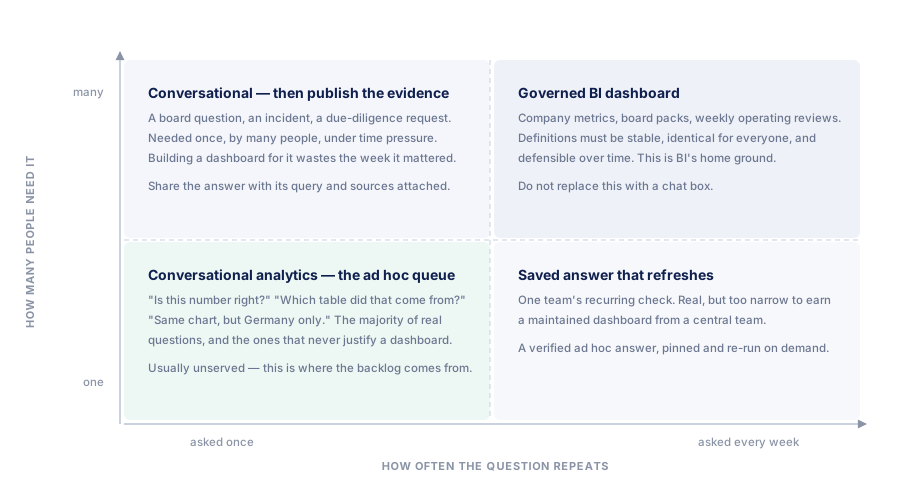
Use frequency and audience to decide what to save
Two useful questions are how often the analysis will recur and how many people need the same definition. They help decide what to maintain; they do not determine a universal product ranking.
| Reporting pattern | Useful outcome |
|---|---|
| One person investigating once | A reviewable query and result, with enough context to explain the finding |
| One person checking each week | A saved chart or query with explicit date logic and a refresh procedure |
| Several people reviewing an investigation | A checked output and the query or definition needed to review it |
| Several teams using the same metric repeatedly | Maintained definitions, appropriate access controls and a supported distribution workflow |
An analyst can move a useful exploratory query into a maintained reporting view. A business user can reuse a checked personal chart. A company-wide report may need scheduled distribution, shared ownership and access policies that a personal dashboard does not supply.
If you already have a BI stack
Keep the reports and metric definitions people rely on. Connect to approved reporting views where available, so a new question starts with the same underlying definitions. Where logic still has to be expressed in SQL, review that logic instead of assuming a familiar table name guarantees consistency. The self-service analytics workflow on the stack you already maintain starts from those approved reporting views.
If an AI answer and a dashboard disagree, compare source refresh, filters, time zones, currency rules and user permissions. Both can be valid answers to different questions, or either can contain an error. Preserve the query and report configuration before changing either one, and use the steps in verify AI-generated SQL and results for the comparison.
If this is your first reporting tool
You do not need an existing warehouse or central analytics team to evaluate reporting from a database. Start with one measure, an approved source and the access needed to read it. Business users can define the reporting need; an analyst or source owner can confirm the relevant fields.
Choose around the deliverable. A personal sales chart and ad hoc investigation have different requirements from scheduled reports sent to several departments. Include setup effort, SQL review, permissions, refresh and export in the trial. Avoid choosing by the “AI” or “traditional” label alone.
What the budget comparison should include
Compare subscription seats, included questions or credits, optional AI charges and source-database compute. Add the work to prepare a usable source, review calculations and maintain recurring reports; the comparison of text-to-SQL with writing SQL by hand itemises that review work for one report. A new follow-up question may be easy to type while still requiring analysis and paid database execution. Estimate costs from the complete workflow and the plans you would use.
Where Datarelix fits
Datarelix supports questions against read-only connections, visible queries and sources, exports, and charts saved to private dashboards. Refresh is on demand. Accounts keep their own connections, conversations and dashboards; a Team subscription pools its allowance without sharing those objects.
If the job requires scheduled delivery or a shared reporting workspace, evaluate a product that explicitly supports those requirements. If the job is to ask questions, review the calculation and keep useful charts, follow the quickstart. See pricing for current limits and dashboard documentation for reuse behavior.